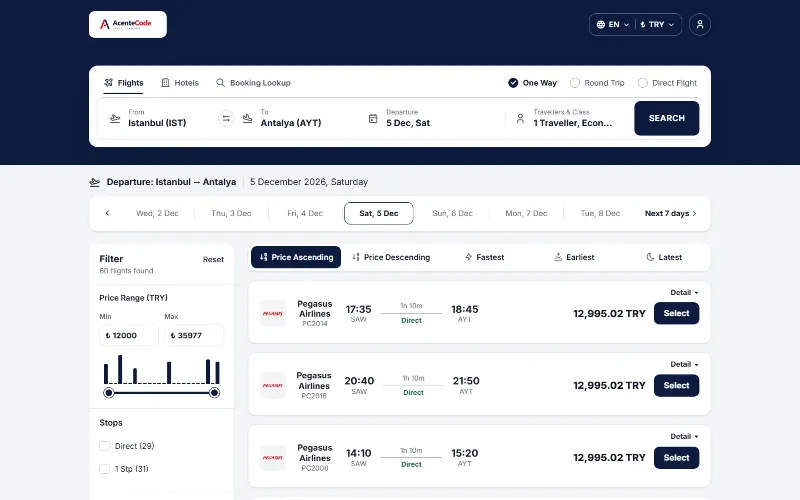
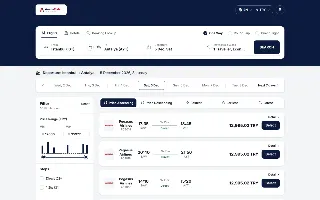
Flight results — 7-day date strip, price range and stops filters; sorting by price, duration and time.
Who Is This For?
Problems We Solve
What Is BISAS?
BISAS is an online flight ticket sales system that manages the entire flow, from flight search to ticket delivery and cancellations. The customer website and the agency panel use the same flight data, the same profit rules and the same payment infrastructure.
Agencies sell through the suppliers connected to the platform, without setting up a supplier connection of their own. A head agency opens its sub-agencies and manages their pricing rules and deposits; each tier sees only its own cost and profit.
BISAS can be used on its own or together with the hotel module as part of Demircode OTA Suite.
Comprehensive Features
Flight Search
- One-way and round-trip; direct flights only option
- City or airport autocomplete (selecting a city includes all of its airports), in the user's language
- Cabin class: Economy, Premium Economy, Business, First
- Adults, children (2–12) and infants (0–2); date of birth for age-based pricing
- Search another day with one click using the 7-day date strip
Results and Filters
- Sorting: cheapest, most expensive, fastest, earliest, latest
- Filters: price range (with distribution chart), number of stops, airline (with logos and counts)
- For round trips, select the outbound flight first, then the return; a sticky bar shows both legs and the total price
- Airline logos are served from the agency's own domain
Fare Families
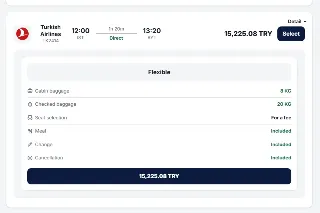
- "Select" opens the airline's fare families, each individually priced at current fares
- Cabin baggage, checked baggage, seat selection, meals, changes and cancellation: Included / Chargeable / Not available
- Lounge, priority boarding and fast track badges
- Checked baggage in kg or pieces; if unknown, no claim is shown
Validated Passenger Details
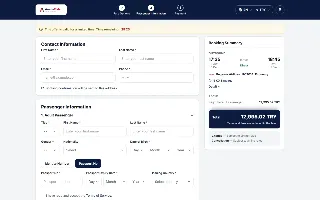
- Turkish national ID (TC) / passport selection; passport mandatory for non-Turkish citizens
- Nationality and issuing country; passport must remain valid beyond the last flight
- Age is validated against the flight date
- Latin characters only, with a "how it will appear on the ticket" preview
- Contact details (phone with country code); offer countdown timer and double-submission protection
- "This is me", quick fill from previous travelers and restoring a partially completed form
Secure Payment
- Price check before booking; if the price has gone up, no booking is made
- Automatic refund for card payments; the deposit hold is released for deposit payments
- 3D Secure card payment; for payments from the agency deposit, the required and available amounts are shown together
- A booking with an uncertain outcome is not retried; urgent alert to the operations team
Automatic Ticket Tracking
- After booking, ticket status is monitored automatically (checks starting at 20 seconds and extending to hourly intervals)
- Ticket numbers are matched to passengers
- "Your booking has been received, your ticket is being prepared" and "Your e-ticket is ready" emails; copy to the agency
- Full refund and notification emails if the ticket cannot be issued
- Agency alerts for issues, a 2-hour delay or less than 24 hours to departure; "Check now" in the panel
After Booking
- Bookings and ticket status in the customer account
- Booking lookup by PNR + last name, booking details with QR code
- Link to the airline's online check-in page
- Cancellation request → operations approval → cancellation and refund emails; printable ticket page
Agency Panel (B2B)
- Search → passenger details → booking flow
- Cost, selling price and a "+profit" label on every fare; customer-specific pricing (cannot go below cost)
- Customer selection and fill-in from saved travelers; identity details are filled in automatically
- A parent agency sees its sub-agencies' bookings; the profits of upper tiers stay hidden
- ID and passport numbers masked, and revealing them is logged; resend booking emails
- Corporate accounts see only the final price
Profit and Finance Management
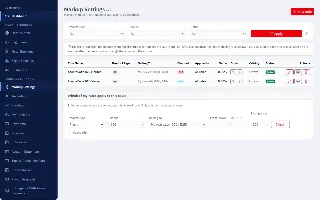
- Ordered markup rules: domestic, international or selected country / city / airport
- Rules by channel (B2C / B2B) and sub-agency; percentage, fixed or per person
- "Which rule applies to this sale?" checker
- Agency deposit, top-up by card or bank transfer, account statement and earnings report (Excel)
How Does BISAS Work?
- Search: The customer selects origin and destination, date, number of passengers and cabin class.
- Compare: Flights are sorted by price, duration and time and narrowed down with price, stops and airline filters.
- Choose a fare family: The airline's fare families are compared with their entitlements and current prices.
- Passenger details: Passenger and contact details are entered with validation, and the legal texts are accepted.
- Pay securely: The price is rechecked; payment is taken via 3D Secure or from the agency deposit.
- Ticket and beyond: The ticket is tracked automatically and the e-ticket email is sent; the customer tracks the booking from their account or by PNR.
Technical Infrastructure
- Modern, layered architecture: .NET-based, layered (Clean Architecture) design; business rules live in one place and every channel applies the same rules.
- Multi-supplier infrastructure: Suppliers are enabled, disabled and prioritized from the admin panel; test and live environments are kept separate and authorized individually for each agency.
- Automated background jobs: Recurring tasks such as exchange rate updates, payment reconciliation, ticket tracking, cancellation verification and the email queue run automatically; data integrity checks run every night.
- Multi-language and multi-currency: Interface in Turkish, English, German, Russian and Serbian; prices displayed in EUR, TRY, USD, GBP and RSD. Exchange rates are updated hourly from central bank data and locked at the time of booking.
- Mobile-friendly interface: The customer website adapts to phones, tablets and desktops.
- Real-time notifications: Instant in-app notifications for panel users; emails to customers and agencies in 5 languages.
- Duplicate transaction protection: Processing the same payment or booking twice is prevented at the system level.
- Reporting and documents: Excel reports, PDF receipts and invoices, booking details with QR codes.
Why BISAS?
- Your own brand: Tickets are sold on the agency's own domain and under its own brand.
- Transparent fare comparison: Customers see what each fare family includes before they buy.
- Payment and ticketing assurance: Price checks, automatic refunds, no retries in uncertain cases and automatic ticket tracking.
- Agency network: Unlimited sub-agencies, ordered profit rules and profit confidentiality.
- Multi-language and multi-currency: Sell to different markets in 5 languages and 5 currencies.
- Grow with hotels: When needed, add the hotel module and move up to Demircode OTA Suite.
Security
- Card details never touch our servers: Payment takes place on the bank's own 3D Secure page; the card number never passes through our system.
- Payment results verified against our own records: Data returned by the bank is signed and encrypted; the outcome is finalized based on the system's own record, not on the returned message.
- Role- and permission-based access: Each user sees only the screens they are authorized for; each agency's data is kept separate from the others.
- Encrypted credentials: Payment and supplier connection credentials are stored encrypted.
- Login and form protection: Accounts are temporarily locked after repeated failed login attempts; public forms are protected against bots.
- Audit log: Sensitive actions are logged; ID and passport numbers are shown masked, and revealing them is logged as well.
- Agreement consent record: A snapshot of the legal text the customer accepted is stored together with a tamper-evident hash (SHA-256), the IP address and the language.
AcenteCode — Travel Booking Platform
Read the brochure of our travel booking platform, which brings flight and hotel sales, the B2B agency network and supplier integrations together in one system.
View the BrochureHow Does the Quote Process Work?
Request QuoteYour journey from inquiry to signed contract, step by step:
Fill the Form
Complete the online quote request form with your requirements.
Expert Review
Our experts analyse your request and prepare a tailored proposal.
Proposal Presentation
The prepared offer is presented to you via e-mail or a meeting.
Negotiation & Approval
Revisions are made if needed and the proposal is approved once agreed.
Contract & Kickoff
The contract is signed and the project or service is officially started.
Post-Purchase Process
Here is how your process unfolds step by step after purchase:
Discovery & Account Setup
1 Business DayGDS provider account information (Amadeus/Galileo/Expedia), airline contract details, bank virtual POS credentials, SMS/email gateway accounts are collected. Needs analysis and architectural design are performed.
Integration & Configuration
2 Business DaysGDS XML/API connections, Turkish bank virtual POS integrations, SMS/email gateway configuration, multi-currency rate integration, sub-agency and commission setup are performed. Agency corporate identity is applied to the B2C interface.
Testing & Agency Training
1 Business DayFlight search, reservation, payment, cancellation-refund test scenarios are run in the sandbox environment. Training is provided to agency staff for B2B panel and B2C interface usage; admin panel reporting training is completed. Training materials and video recordings are shared.
Go-Live & Support
1 Business DayBISAS is launched in the live environment; production GDS and bank POS accounts are activated. Dashboard, reports, and customer flow are monitored closely on day one. SLA-based support contract begins after go-live; 24/7 system monitoring, weekday technical support and regular updates are provided.
Modules
Included Modules
Payment by Credit Card
Payment by Bank Transfer
Quote-Based Process
FAQ
An online flight booking and ticket sales system that lets agencies sell flight tickets through their own branded websites and agency panels.
BISAS uses a multi-supplier infrastructure; the flights listed are those offered by the connected suppliers.
No. Agencies sell through the suppliers connected to the platform; supplier permissions are granted per agency from the admin panel.
Each fare family is shown with its current price and its baggage, seat selection, meals, change and cancellation rights marked as "Included / Chargeable / Not available".
The price is rechecked before booking. If it has gone up, no booking is made; for card payments the refund starts automatically, and for deposit payments the hold is released.
Ticket status is monitored automatically after booking. Once the ticket is issued, ticket numbers are matched to passengers and an e-ticket email is sent to the customer and the agency. The agency is alerted in case of delays or issues.
Yes. Sub-agencies can be opened with no tier limit; each tier sets its own profit rules and sees only its own cost and profit. A parent agency monitors its sub-agencies' bookings.
Turkish, English, German, Russian and Serbian; EUR, TRY, USD, GBP and RSD. Exchange rates are updated hourly from central bank data and locked at the time of booking.
The customer or the agency opens a cancellation request; the operations team approves or rejects it. An email is sent at every step; refunds are made according to the payment method.
Yes. Search, results, fare selection and the passenger form all adapt to phones and tablets.
Related Products



Related Services

Related Blog Posts